pacman::p_load(
  tidyverse,
  gt,
  gtsummary, # gt扩展包,提供了数据摘要表格的功能
  gtExtras, # gt扩展包,提供了针对gt包的额外功能
  tablespan, # gt扩展包,可以将表格输出至excel
  gto, # gt扩展包,可以将表格输出至word和ppt
  janitor
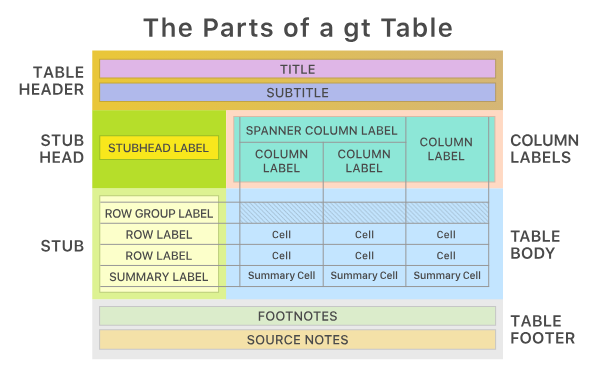
)gt包将表格分解为一套连贯的部件,通过这些部件创建表格。这些部件如图 图 1 所示。
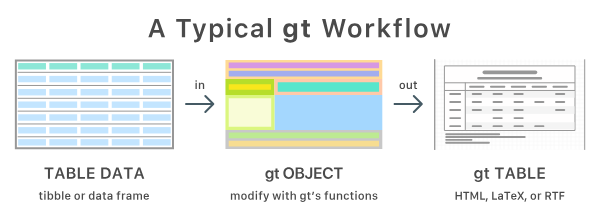
通过gt创建的表格的典型步骤如图 图 2 所示
通过一个例子,使用gt包附带的sp500数据集简单演示一下gt的使用。
# define the start and end dates for data range
start_date <- "2010-06-07"
end_date <- "2020-06-14"

# 通过gt建立表格
# 以下是添加注释后的代码:

sp500 |> # 使用管道操作符(|>)将sp500数据集传递给后续操作
  dplyr::filter(date >= start_date & date <= end_date) |> # 筛选日期在start_date和end_date之间的数据
  dplyr::select(-adj_close) |> # 移除adj_close列(负号表示排除该列)
  slice_head(n = 10) |> # 只保留前10行数据
  gt() |> # 使用gt包创建美观的表格
  tab_header(
    title = "S&P 500", # 设置表格主标题为"S&P 500"
    subtitle = glue::glue("{start_date} to {end_date}") # 使用glue设置副标题为日期范围
  ) |>
  fmt_currency() |> # 将所有数值列格式化为货币格式
  fmt_date(columns = date, date_style = "wd_m_day_year") |> # 将date列格式化为"星期, 月 日, 年"的日期格式
fmt_number(columns = volume, suffixing = TRUE) # 将volume列格式化为带有千(K)、百万(M)等后缀的数字格式| S&P 500 | |||||
| 2010-06-07 to 2020-06-14 | |||||
| date | open | high | low | close | volume |
|---|---|---|---|---|---|
| Thu, Dec 31, 2015 | $2,060.59 | $2,062.54 | $2,043.62 | $2,043.94 | 2.66B |
| Wed, Dec 30, 2015 | $2,077.34 | $2,077.34 | $2,061.97 | $2,063.36 | 2.37B |
| Tue, Dec 29, 2015 | $2,060.54 | $2,081.56 | $2,060.54 | $2,078.36 | 2.54B |
| Mon, Dec 28, 2015 | $2,057.77 | $2,057.77 | $2,044.20 | $2,056.50 | 2.49B |
| Thu, Dec 24, 2015 | $2,063.52 | $2,067.36 | $2,058.73 | $2,060.99 | 1.41B |
| Wed, Dec 23, 2015 | $2,042.20 | $2,064.73 | $2,042.20 | $2,064.29 | 3.48B |
| Tue, Dec 22, 2015 | $2,023.15 | $2,042.74 | $2,020.49 | $2,038.97 | 3.52B |
| Mon, Dec 21, 2015 | $2,010.27 | $2,022.90 | $2,005.93 | $2,021.15 | 3.76B |
| Fri, Dec 18, 2015 | $2,040.81 | $2,040.81 | $2,005.33 | $2,005.55 | 6.68B |
| Thu, Dec 17, 2015 | $2,073.76 | $2,076.37 | $2,041.66 | $2,041.89 | 4.33B |
1 gt包-整洁的建立表格
R表格包太多太乱了让人不知道用哪个。gt包是Posit出品,秉承ggplot2理念,再加上它的扩展包gtsummary包(学术),gto包(导出到word,PPT),tablespan包(导出到Excel),会出现一统的趋势。
我们可以将展示表格视为仅用于输出,不希望再次将其用作输入。其他功能包括注释、表格元素样式和文本转换,这些都有助于更清晰地传达主题内容。
注意,我们要展示的表格最好不再参与之后的处理,而是要展示的最终结果。
1.1 gt包的简单表格入门
我们用islands数据集来演示gt包的基本用法。islands数据集实际为一个数字型的向量,包含世界各地岛屿的面积(平方英里)。我们将其转换为数据框以便使用gt包。
# A tibble: 10 × 2
   name           size
   <chr>         <dbl>
 1 Asia          16988
 2 Africa        11506
 3 North America  9390
 4 South America  6795
 5 Antarctica     5500
 6 Europe         3745
 7 Australia      2968
 8 Greenland       840
 9 New Guinea      306
10 Borneo 280接下来,我们使用gt()函数将数据框转换为gt表格对象。
# Create a gt table
gt_tbl <- gt(islands_tbl)
gt_tbl # print the gt table as html widget| name | size |
|---|---|
| Asia | 16988 |
| Africa | 11506 |
| North America | 9390 |
| South America | 6795 |
| Antarctica | 5500 |
| Europe | 3745 |
| Australia | 2968 |
| Greenland | 840 |
| New Guinea | 306 |
| Borneo | 280 |
在以上表格的基础上,根据 图 3 为gt_tbl对象添加对应的部分。

大致包括一下几个部分。
1.2 表头(Table Header)
可选;包含标题和可能的副标题。gt::tab_header()。我们可以使用md()函数在表头的部分使用markdown格式。
# 直接添加标题
gt_tbl_header <- gt_tbl |>
  tab_header(
    title = "Large Landmasses of the World",
    subtitle = "The top ten largest are presented"
  )
gt_tbl_header| Large Landmasses of the World | |
| The top ten largest are presented | |
| name | size |
|---|---|
| Asia | 16988 |
| Africa | 11506 |
| North America | 9390 |
| South America | 6795 |
| Antarctica | 5500 |
| Europe | 3745 |
| Australia | 2968 |
| Greenland | 840 |
| New Guinea | 306 |
| Borneo | 280 |
# 使用markdown格式
gt_tbl_header <- gt_tbl |>
  tab_header(
    title = md("**Large Landmasses of the World**"), # 加粗
    subtitle = md("The *top ten* largest are presented") # 斜体
  )
gt_tbl_header| Large Landmasses of the World | |
| The top ten largest are presented | |
| name | size |
|---|---|
| Asia | 16988 |
| Africa | 11506 |
| North America | 9390 |
| South America | 6795 |
| Antarctica | 5500 |
| Europe | 3745 |
| Australia | 2968 |
| Greenland | 840 |
| New Guinea | 306 |
| Borneo | 280 |
1.4 存根与存根标题(the Stub and the Stub Head)
可选;包含行标签,可选择性地置于行组内,行组可带有行组标签,且在存在汇总时可能包含汇总标签。gt::tab_stubhead()。
Stub表侧栏是表格左侧的区域,包含行标签,可能包含行组标签和汇总标签。这些子部分可以按行组顺序进行分组。表侧栏标题为描述表侧栏的标签提供位置。表侧栏是可选的,因为在某些情况下表侧栏并不实用(例如,之前展示的表格在没有表侧栏的情况下也能正常显示)。
可以简单的理解为行名列。
gt_tbl_stab <- islands_tbl |>
  gt(rowname_col = "name") |> # stub列
  tab_stubhead(label = "landmass") # stub列名
gt_tbl_stab| landmass | size |
|---|---|
| Asia | 16988 |
| Africa | 11506 |
| North America | 9390 |
| South America | 6795 |
| Antarctica | 5500 |
| Europe | 3745 |
| Australia | 2968 |
| Greenland | 840 |
| New Guinea | 306 |
| Borneo | 280 |
这里需要特别注意的一点是,在没有存根列时,表格有两列(列标签为 name 和 size ),但现在第 1 列(唯一的一列)是 size 。也可以理解为stub列是不算在gt表格的主体中的。
再添加了stub列后,我们就可以使用tab_row_group()函数将行划分为不同的组别,并在每个组的上方显示组标签。
# 添加gt表格各个组件
gt_tbl <- gt_tbl_stab |> # gt_tbl_stab是上一个步骤创建的表格对象,已经包含了stub列和stub标题
  tab_header(
    title = "Large Landmasses of the World",
    subtitle = "The top ten largest are presented"
  ) |>
  tab_source_note(
    source_note = "Source: The World Almanac and Book of Facts, 1975, page 406."
  ) |>
  tab_source_note(
    source_note = md(
      "Reference: McNeil, D. R. (1977) *Interactive Data Analysis*. Wiley."
    )
  ) |>
  tab_footnote(
    footnote = md("The **largest** by area."),
    locations = cells_body(columns = size, rows = largest)
  ) |>
  tab_footnote(
    footnote = "The lowest by population.",
    locations = cells_body(columns = size, rows = contains("arc"))
  )
gt_tbl| Large Landmasses of the World | |
| The top ten largest are presented | |
| landmass | size |
|---|---|
| Asia | 1 16988 |
| Africa | 11506 |
| North America | 9390 |
| South America | 6795 |
| Antarctica | 2 5500 |
| Europe | 3745 |
| Australia | 2968 |
| Greenland | 840 |
| New Guinea | 306 |
| Borneo | 280 |
| 1 The largest by area. | |
| 2 The lowest by population. | |
| Source: The World Almanac and Book of Facts, 1975, page 406. | |
| Reference: McNeil, D. R. (1977) Interactive Data Analysis. Wiley. | |
# 行分组
gt_tbl_rowgroup <- gt_tbl |>
  tab_row_group(label = md("**Continent**"), rows = 1:6) |>
  tab_row_group(label = "Country", rows = c("Australia", "Greenland")) |>
  tab_row_group(label = "Subregion", rows = c("New Guinea", "Borneo"))

gt_tbl_rowgroup| Large Landmasses of the World | |
| The top ten largest are presented | |
| landmass | size |
|---|---|
| Subregion | |
| New Guinea | 306 |
| Borneo | 280 |
| Country | |
| Australia | 2968 |
| Greenland | 840 |
| Continent | |
| Asia | 1 16988 |
| Africa | 11506 |
| North America | 9390 |
| South America | 6795 |
| Antarctica | 2 5500 |
| Europe | 3745 |
| 1 The largest by area. | |
| 2 The lowest by population. | |
| Source: The World Almanac and Book of Facts, 1975, page 406. | |
| Reference: McNeil, D. R. (1977) Interactive Data Analysis. Wiley. | |
Tip
创建行分组的另一种方法是在输入数据表中包含一个分组名称的列。以我们上述的 islands_tbl 为例,若在适当行中设置包含 continent 、 country 和 subregion 类别的 groupname 列,当使用 gt() 函数的 groupname_col 参数时(例如 gt(islands_tbl, rowname_col = "name", groupname_col = "groupname") |> ... ),就会生成行分组。这样就不再需要使用 tab_row_group() 。
这种在列中提供分组名称的策略有时更具优势,因为我们可以依赖诸如 dplyr 中的函数来生成类别(例如使用 case_when() 或 if_else() )。
具体例子可参看gt()函数的帮助说明。
1.5 列标签(Column Labels)
包含列标签,可选择位于跨列标签下方。
表格的列标签部分至少包含列及其列标签。上一个示例中有一个单独的列: size 。正如在存根(Stub)中一样,我们可以创建称为跨列的分组,这些分组包含一个或多个列。tab_spanner()函数的功能正是如此。
我们使用包含更多列的airquality为例。
   Ozone Solar.R Wind Temp Month Day Year
1     41     190  7.4   67     5   1 1973
2     36     118  8.0   72     5   2 1973
3     12     149 12.6   74     5   3 1973
4     18     313 11.5   62     5   4 1973
5     NA      NA 14.3   56     5   5 1973
6     28      NA 14.9   66     5   6 1973
7     23     299  8.6   65     5   7 1973
8     19      99 13.8   59     5   8 1973
9      8      19 20.1   61     5   9 1973
10    NA     194  8.6   69     5  10 1973
# Create a display table using the `airquality_m`
# dataset; arrange columns into groups
gt_tbl_air <- airquality_m |>
gt() |>
tab_header(
title = "New York Air Quality Measurements",
subtitle = "Daily measurements in New York City (May 1-10, 1973)"
) |>
tab_spanner(label = "Time", columns = c(Year, Month, Day)) |>
tab_spanner(label = "Measurement", columns = c(Ozone, Solar.R, Wind, Temp))
gt_tbl_air| New York Air Quality Measurements | ||||||
| Daily measurements in New York City (May 1-10, 1973) | ||||||
Measurement
|
Time
|
|||||
|---|---|---|---|---|---|---|
| Ozone | Solar.R | Wind | Temp | Year | Month | Day |
| 41 | 190 | 7.4 | 67 | 1973 | 5 | 1 |
| 36 | 118 | 8.0 | 72 | 1973 | 5 | 2 |
| 12 | 149 | 12.6 | 74 | 1973 | 5 | 3 |
| 18 | 313 | 11.5 | 62 | 1973 | 5 | 4 |
| NA | NA | 14.3 | 56 | 1973 | 5 | 5 |
| 28 | NA | 14.9 | 66 | 1973 | 5 | 6 |
| 23 | 299 | 8.6 | 65 | 1973 | 5 | 7 |
| 19 | 99 | 13.8 | 59 | 1973 | 5 | 8 |
| 8 | 19 | 20.1 | 61 | 1973 | 5 | 9 |
| NA | 194 | 8.6 | 69 | 1973 | 5 | 10 |
以上gt_tbl_ari表格已经比较美观,但我们还可以进一步美化:
- 将
Time列移至序列的开头: 使用cols_move_to_start()。 - 自定义列标签,使其更具描述性: 使用
cols_label()。
gt_tbl_air_modify <- gt_tbl_air |>
cols_move_to_start(columns = c(Year, Month, Day)) |>
cols_label(
Ozone = html("Ozone, <br>ppbV"),
Solar.R = html("Solar.R, <br>cal/m<sup>2</sup>"),
Wind = html("Wind, <br>mph"),
Temp = html("Temp, <br>°F")
)
gt_tbl_air_modify| New York Air Quality Measurements | ||||||
| Daily measurements in New York City (May 1-10, 1973) | ||||||
Time
|
Measurement
|
|||||
|---|---|---|---|---|---|---|
| Year | Month | Day | Ozone, ppbV |
Solar.R, cal/m2 |
Wind, mph |
Temp, °F |
| 1973 | 5 | 1 | 41 | 190 | 7.4 | 67 |
| 1973 | 5 | 2 | 36 | 118 | 8.0 | 72 |
| 1973 | 5 | 3 | 12 | 149 | 12.6 | 74 |
| 1973 | 5 | 4 | 18 | 313 | 11.5 | 62 |
| 1973 | 5 | 5 | NA | NA | 14.3 | 56 |
| 1973 | 5 | 6 | 28 | NA | 14.9 | 66 |
| 1973 | 5 | 7 | 23 | 299 | 8.6 | 65 |
| 1973 | 5 | 8 | 19 | 99 | 13.8 | 59 |
| 1973 | 5 | 9 | 8 | 19 | 20.1 | 61 |
| 1973 | 5 | 10 | NA | 194 | 8.6 | 69 |
除cols_move_to_start()外,gt包还提供了其他一些函数来调整列的位置,例如cols_move_to、cols_move_end()。这些函数允许我们根据需要将列移动到表格的不同位置,从而更好地组织和展示数据。
2 案例-gtcars数据集
让我们使用 gtcars 数据集制作一个展示表格。gtcars 数据集本质上是为 gt 时代现代化改造的 mtcars 。它是 gt 包的一部分,加载gt后可直接使用。在开始之前,为了更深入的了解gt,我们需要通过dplyr对数据进行预处理,减少表格的行数。
gtcars_8 <- gtcars |>
  group_by(ctry_origin) |>
  slice_head(n = 2) |>
  ungroup() |>
  filter(ctry_origin != "United Kingdom")
gtcars_8
# A tibble: 8 × 15
mfr model year trim bdy_style hp hp_rpm trq trq_rpm mpg_c mpg_h
<chr> <chr> <dbl> <chr> <chr> <dbl> <dbl> <dbl> <dbl> <dbl> <dbl>
1 BMW 6-Seri… 2016 640 … coupe 315 5800 330 1400 20 30
2 BMW i8 2016 Mega… coupe 357 5800 420 3700 28 29
3 Ferrari 458 Sp… 2015 Base… coupe 597 9000 398 6000 13 17
4 Ferrari 458 Sp… 2015 Base converti… 562 9000 398 6000 13 17
5 Acura NSX 2017 Base… coupe 573 6500 476 2000 21 22
6 Nissan GT-R 2016 Prem… coupe 545 6400 436 3200 16 22
7 Ford GT 2017 Base… coupe 647 6250 550 5900 11 18
8 Chevrolet Corvet… 2016 Z06 … coupe 650 6400 650 3600 15 22
# ℹ 4 more variables: drivetrain <chr>, trsmn <chr>, ctry_origin <chr>,
# msrp <dbl>基于gtcars_8数据集,制作一个gt展示表格,并满足以下10项具体要求:
- 将汽车按照汽车制造商的原产国特征分组。
- 移除一些不需要展示的列。
- 将某些列合并为一个列组。
- 将货币数据格式化,并使用等宽字体以便阅读。
- 添加标题与副标题。
- 添加脚注以突出显示一些有趣的数据点,并解释数据中较为特殊的方面。
- 添加来源说明以提供数据的出处。
- 转换
trsmn列(传统系统)编码,使其更清晰易懂。 - 根据基本条件设置某些单元格的格式。
- 突出显示为视为
grand toures(豪华履行车)的汽车。
2.1 行分组
根据汽车制造商的原产国进行行分组。
- 使用
dplyr::group_by()函数对数据进行分组,按照ctry_origin列进行分组并排序。同时删除不想要展示的列,并建立新的列。 - 将分好组的数据传递给
gt()函数。- 此处可以使用
rowname_col参数指定一个列作为行标签(例如之前建立的新列),也可以不指定行标签列,此时gt会自动创建一个默认的行标签列。
- 此处可以使用
order_countries <- c("Germany", "Italy", "United States", "Japan") # 定义行分组的顺序

# 对数据进行分组、排序和预处理并创建gt表格
gtcars_8_grouped_tab <- gtcars_8 |>
  arrange(factor(ctry_origin, levels = order_countries), mfr, desc(msrp)) |>
  mutate(car = paste(mfr, model)) |> # 创建一个新的列car,将mfr和model列的内容合并为一个字符串
  select(-c(mfr, model)) |>
  group_by(ctry_origin) |>
  gt(rowname_col = "car") # 将新建立的car列作为行标签列
gtcars_8_grouped_tab| year | trim | bdy_style | hp | hp_rpm | trq | trq_rpm | mpg_c | mpg_h | drivetrain | trsmn | msrp | |
|---|---|---|---|---|---|---|---|---|---|---|---|---|
| Germany | ||||||||||||
| BMW i8 | 2016 | Mega World Coupe | coupe | 357 | 5800 | 420 | 3700 | 28 | 29 | awd | 6am | 140700 |
| BMW 6-Series | 2016 | 640 I Coupe | coupe | 315 | 5800 | 330 | 1400 | 20 | 30 | rwd | 8am | 77300 |
| Italy | ||||||||||||
| Ferrari 458 Speciale | 2015 | Base Coupe | coupe | 597 | 9000 | 398 | 6000 | 13 | 17 | rwd | 7a | 291744 |
| Ferrari 458 Spider | 2015 | Base | convertible | 562 | 9000 | 398 | 6000 | 13 | 17 | rwd | 7a | 263553 |
| United States | ||||||||||||
| Chevrolet Corvette | 2016 | Z06 Coupe | coupe | 650 | 6400 | 650 | 3600 | 15 | 22 | rwd | 7m | 88345 |
| Ford GT | 2017 | Base Coupe | coupe | 647 | 6250 | 550 | 5900 | 11 | 18 | rwd | 7a | 447000 |
| Japan | ||||||||||||
| Acura NSX | 2017 | Base Coupe | coupe | 573 | 6500 | 476 | 2000 | 21 | 22 | awd | 9a | 156000 |
| Nissan GT-R | 2016 | Premium Coupe | coupe | 545 | 6400 | 436 | 3200 | 16 | 22 | awd | 6a | 101770 |
2.2 隐藏与移动部分列
- 使用
cols_hide()函数隐藏不需要展示的列。 - 使用
cols_move_to_start()函数将某些列移动到表格的开头。类似的函数还有cols_move()和cols_move_end(),可以根据需要将列移动到表格的不同位置。 - 值得注意的是,以上的操作均可以通过
dplyr::select()实现。
| year | trim | trsmn | mpg_c | mpg_h | hp | hp_rpm | trq | trq_rpm | msrp | |
|---|---|---|---|---|---|---|---|---|---|---|
| Germany | ||||||||||
| BMW i8 | 2016 | Mega World Coupe | 6am | 28 | 29 | 357 | 5800 | 420 | 3700 | 140700 |
| BMW 6-Series | 2016 | 640 I Coupe | 8am | 20 | 30 | 315 | 5800 | 330 | 1400 | 77300 |
| Italy | ||||||||||
| Ferrari 458 Speciale | 2015 | Base Coupe | 7a | 13 | 17 | 597 | 9000 | 398 | 6000 | 291744 |
| Ferrari 458 Spider | 2015 | Base | 7a | 13 | 17 | 562 | 9000 | 398 | 6000 | 263553 |
| United States | ||||||||||
| Chevrolet Corvette | 2016 | Z06 Coupe | 7m | 15 | 22 | 650 | 6400 | 650 | 3600 | 88345 |
| Ford GT | 2017 | Base Coupe | 7a | 11 | 18 | 647 | 6250 | 550 | 5900 | 447000 |
| Japan | ||||||||||
| Acura NSX | 2017 | Base Coupe | 9a | 21 | 22 | 573 | 6500 | 476 | 2000 | 156000 |
| Nissan GT-R | 2016 | Premium Coupe | 6a | 16 | 22 | 545 | 6400 | 436 | 3200 | 101770 |
2.3 列分组
- 使用
tab_spanner()函数将某些列分组为一个列组。
# 将 mpg_c 、 mpg_h 、 hp 、 hp_rpm 、 trq 、 trq_rpm 列放在 Performance 跨列标签下,其余列不分组
gtcars_8_column_grouping_tab <- gtcars_8_hide_move_tab |>
  tab_spanner(
    label = "Performance",
    columns = c(mpg_c, mpg_h, hp, hp_rpm, trq, trq_rpm)
  )
gtcars_8_column_grouping_tab| year | trim | trsmn |
Performance
|
msrp | ||||||
|---|---|---|---|---|---|---|---|---|---|---|
| mpg_c | mpg_h | hp | hp_rpm | trq | trq_rpm | |||||
| Germany | ||||||||||
| BMW i8 | 2016 | Mega World Coupe | 6am | 28 | 29 | 357 | 5800 | 420 | 3700 | 140700 |
| BMW 6-Series | 2016 | 640 I Coupe | 8am | 20 | 30 | 315 | 5800 | 330 | 1400 | 77300 |
| Italy | ||||||||||
| Ferrari 458 Speciale | 2015 | Base Coupe | 7a | 13 | 17 | 597 | 9000 | 398 | 6000 | 291744 |
| Ferrari 458 Spider | 2015 | Base | 7a | 13 | 17 | 562 | 9000 | 398 | 6000 | 263553 |
| United States | ||||||||||
| Chevrolet Corvette | 2016 | Z06 Coupe | 7m | 15 | 22 | 650 | 6400 | 650 | 3600 | 88345 |
| Ford GT | 2017 | Base Coupe | 7a | 11 | 18 | 647 | 6250 | 550 | 5900 | 447000 |
| Japan | ||||||||||
| Acura NSX | 2017 | Base Coupe | 9a | 21 | 22 | 573 | 6500 | 476 | 2000 | 156000 |
| Nissan GT-R | 2016 | Premium Coupe | 6a | 16 | 22 | 545 | 6400 | 436 | 3200 | 101770 |
2.4 和并列并添加标签
- 使用
cols_merge()函数将某些列合并为一个列。-
cols_merge()使用col_1列和col_2列。合并后,col_1列将被保留,col_2列将被删除。 -
pattern使用参数{1}和{2}分别代表col_1和col_2列的值。 - 针对
HTML表格,还可以使用html标签来调整合并后列的格式,例如<br>标签可以在合并后的列中创建换行。 - 当使用
<<>>将pattern参数中的文本包裹起来时,表示当存在NA值时,移除双花括号内的所有内容。例如当我们发现一行中有两列的值都是NA时,与其让NA出现在展示的表格中,不如将本条目完全删除。
-
- 使用
cols_label()函数为新列添加标签。
注意,使用gt创建的表格最好直接用来展示,而不需要进行继续的加工。
gtcars_8_merge_columns_tab <- gtcars_8_column_grouping_tab |>
  cols_merge(columns = c(mpg_c, mpg_h), pattern = "<<{1}c<br>{2}h>>") |>
  cols_merge(columns = c(hp, hp_rpm), pattern = "{1}<br>@{2}rpm") |>
  cols_merge(columns = c(trq, trq_rpm), pattern = "{1}<br>@{2}rpm") |>
  cols_label(
    mpg_c = "MPG",
    hp = "HP",
    trq = "Torque",
    year = "Year",
    trim = "Trim",
    trsmn = "Transmission",
    msrp = "MSRP"
  )
gtcars_8_merge_columns_tab| Year | Trim | Transmission |
Performance
|
MSRP | |||
|---|---|---|---|---|---|---|---|
| MPG | HP | Torque | |||||
| Germany | |||||||
| BMW i8 | 2016 | Mega World Coupe | 6am | 28c 29h |
357 @5800rpm |
420 @3700rpm |
140700 |
| BMW 6-Series | 2016 | 640 I Coupe | 8am | 20c 30h |
315 @5800rpm |
330 @1400rpm |
77300 |
| Italy | |||||||
| Ferrari 458 Speciale | 2015 | Base Coupe | 7a | 13c 17h |
597 @9000rpm |
398 @6000rpm |
291744 |
| Ferrari 458 Spider | 2015 | Base | 7a | 13c 17h |
562 @9000rpm |
398 @6000rpm |
263553 |
| United States | |||||||
| Chevrolet Corvette | 2016 | Z06 Coupe | 7m | 15c 22h |
650 @6400rpm |
650 @3600rpm |
88345 |
| Ford GT | 2017 | Base Coupe | 7a | 11c 18h |
647 @6250rpm |
550 @5900rpm |
447000 |
| Japan | |||||||
| Acura NSX | 2017 | Base Coupe | 9a | 21c 22h |
573 @6500rpm |
476 @2000rpm |
156000 |
| Nissan GT-R | 2016 | Premium Coupe | 6a | 16c 22h |
545 @6400rpm |
436 @3200rpm |
101770 |
2.5 使用格式化函数
- 使用
fmt_**()系列函数对数据进行格式化。如货币格式化函数fmt_currency()等。 - 值得注意的是,我们在指定格式化列的时候,仍需要使用其原始列名,而不是展示的
label列名。
gtcars_8_formatting_tab <- gtcars_8_merge_columns_tab |>
  fmt_currency(columns = msrp, currency = "USD", decimals = 0)
gtcars_8_formatting_tab| Year | Trim | Transmission |
Performance
|
MSRP | |||
|---|---|---|---|---|---|---|---|
| MPG | HP | Torque | |||||
| Germany | |||||||
| BMW i8 | 2016 | Mega World Coupe | 6am | 28c 29h |
357 @5800rpm |
420 @3700rpm |
$140,700 |
| BMW 6-Series | 2016 | 640 I Coupe | 8am | 20c 30h |
315 @5800rpm |
330 @1400rpm |
$77,300 |
| Italy | |||||||
| Ferrari 458 Speciale | 2015 | Base Coupe | 7a | 13c 17h |
597 @9000rpm |
398 @6000rpm |
$291,744 |
| Ferrari 458 Spider | 2015 | Base | 7a | 13c 17h |
562 @9000rpm |
398 @6000rpm |
$263,553 |
| United States | |||||||
| Chevrolet Corvette | 2016 | Z06 Coupe | 7m | 15c 22h |
650 @6400rpm |
650 @3600rpm |
$88,345 |
| Ford GT | 2017 | Base Coupe | 7a | 11c 18h |
647 @6250rpm |
550 @5900rpm |
$447,000 |
| Japan | |||||||
| Acura NSX | 2017 | Base Coupe | 9a | 21c 22h |
573 @6500rpm |
476 @2000rpm |
$156,000 |
| Nissan GT-R | 2016 | Premium Coupe | 6a | 16c 22h |
545 @6400rpm |
436 @3200rpm |
$101,770 |
2.6 列对齐与样式变更
- 使用
cols_align()函数调整列的对齐方式。 - 使用
tab_style()函数调整单元格的样式。-
style参数使用cell_**()系列函数来定义样式,例如cell_text()、cell_fill()、cell_borders()。 -
locations参数用于指定单元格位置,例如cells_body()。
-
gtcars_8_alignment_styling_tab <- gtcars_8_formatting_tab |>
  cols_align(columns = c(mpg_c, hp, trq), align = "center") |>
  tab_style(
    style = cell_text(size = px(12)), # 设置字体大小为12像素
    locations = cells_body(columns = c(trim, trsmn, mpg_c, trq)) # 设置trim、trsmn、mpg_c和trq列的单元格文本样式
  )
gtcars_8_alignment_styling_tab| Year | Trim | Transmission |
Performance
|
MSRP | |||
|---|---|---|---|---|---|---|---|
| MPG | HP | Torque | |||||
| Germany | |||||||
| BMW i8 | 2016 | Mega World Coupe | 6am | 28c 29h |
357 @5800rpm |
420 @3700rpm |
$140,700 |
| BMW 6-Series | 2016 | 640 I Coupe | 8am | 20c 30h |
315 @5800rpm |
330 @1400rpm |
$77,300 |
| Italy | |||||||
| Ferrari 458 Speciale | 2015 | Base Coupe | 7a | 13c 17h |
597 @9000rpm |
398 @6000rpm |
$291,744 |
| Ferrari 458 Spider | 2015 | Base | 7a | 13c 17h |
562 @9000rpm |
398 @6000rpm |
$263,553 |
| United States | |||||||
| Chevrolet Corvette | 2016 | Z06 Coupe | 7m | 15c 22h |
650 @6400rpm |
650 @3600rpm |
$88,345 |
| Ford GT | 2017 | Base Coupe | 7a | 11c 18h |
647 @6250rpm |
550 @5900rpm |
$447,000 |
| Japan | |||||||
| Acura NSX | 2017 | Base Coupe | 9a | 21c 22h |
573 @6500rpm |
476 @2000rpm |
$156,000 |
| Nissan GT-R | 2016 | Premium Coupe | 6a | 16c 22h |
545 @6400rpm |
436 @3200rpm |
$101,770 |
2.7 文本字体格式转换
- 使用
text_transform()函数对文本进行格式转换。 - 通过
cells_body()位置辅助函数定位数据单元格后,我们向fn参数提供一个函数,该函数处理文本向量并返回一个格式化的文本向量。对于 HTML 表格,返回的文本可以包含 HTML 标签以调整格式。
gtcars_8_text_transform_tab <- gtcars_8_alignment_styling_tab |>
  text_transform(
    locations = cells_body(columns = trsmn), # 定位trim列的单元格
    fn = function(x) {
      # The first character of `x` always
      # indicates the number of transmission speeds
      speed <- substr(x, 1, 1) # 提取trim列中每个值的第一个字符

      # We can carefully determine which transmission
      # type we have in `x` with a `dplyr::case_when()`
      # statement
      type <- dplyr::case_when(
        substr(x, 2, 3) == "am" ~ "Automatic/Maunal", # 如果trim列中每个值的第2和第3个字符是"am",则类型为"Automatic/Manual"
        substr(x, 2, 2) == "m" ~ "Manual", # 如果trim列中每个值的第2个字符是"m",则类型为"Manual"
        substr(x, 2, 2) == "a" ~ "Automatic", # 如果trim列中每个值的第2个字符是"a",则类型为"Automatic"
        substr(x, 2, 3) == "dd" ~ "Direct Drive" # 如果trim列中每个值的第2和第3个字符是"dd",则类型为"Direct Drive"
      )

      # Let's paste together the `speed` and `type`
      # vectors to create HTML text replacing `x`
      paste(speed, " Speed<br><em>", type, "</em>")
    }
  )
gtcars_8_text_transform_tab| Year | Trim | Transmission |
Performance
|
MSRP | |||
|---|---|---|---|---|---|---|---|
| MPG | HP | Torque | |||||
| Germany | |||||||
| BMW i8 | 2016 | Mega World Coupe | 6 Speed Automatic/Maunal |
28c 29h |
357 @5800rpm |
420 @3700rpm |
$140,700 |
| BMW 6-Series | 2016 | 640 I Coupe | 8 Speed Automatic/Maunal |
20c 30h |
315 @5800rpm |
330 @1400rpm |
$77,300 |
| Italy | |||||||
| Ferrari 458 Speciale | 2015 | Base Coupe | 7 Speed Automatic |
13c 17h |
597 @9000rpm |
398 @6000rpm |
$291,744 |
| Ferrari 458 Spider | 2015 | Base | 7 Speed Automatic |
13c 17h |
562 @9000rpm |
398 @6000rpm |
$263,553 |
| United States | |||||||
| Chevrolet Corvette | 2016 | Z06 Coupe | 7 Speed Manual |
15c 22h |
650 @6400rpm |
650 @3600rpm |
$88,345 |
| Ford GT | 2017 | Base Coupe | 7 Speed Automatic |
11c 18h |
647 @6250rpm |
550 @5900rpm |
$447,000 |
| Japan | |||||||
| Acura NSX | 2017 | Base Coupe | 9 Speed Automatic |
21c 22h |
573 @6500rpm |
476 @2000rpm |
$156,000 |
| Nissan GT-R | 2016 | Premium Coupe | 6 Speed Automatic |
16c 22h |
545 @6400rpm |
436 @3200rpm |
$101,770 |
2.8 添加来源
- 使用
tab_source_note()函数添加来源说明。
gtcars_8_source_note_tab <- gtcars_8_text_transform_tab |>
  tab_source_note(source_note = "来源:Edmonds 网站内的多个页面。")
gtcars_8_source_note_tab| Year | Trim | Transmission |
Performance
|
MSRP | |||
|---|---|---|---|---|---|---|---|
| MPG | HP | Torque | |||||
| Germany | |||||||
| BMW i8 | 2016 | Mega World Coupe | 6 Speed Automatic/Maunal |
28c 29h |
357 @5800rpm |
420 @3700rpm |
$140,700 |
| BMW 6-Series | 2016 | 640 I Coupe | 8 Speed Automatic/Maunal |
20c 30h |
315 @5800rpm |
330 @1400rpm |
$77,300 |
| Italy | |||||||
| Ferrari 458 Speciale | 2015 | Base Coupe | 7 Speed Automatic |
13c 17h |
597 @9000rpm |
398 @6000rpm |
$291,744 |
| Ferrari 458 Spider | 2015 | Base | 7 Speed Automatic |
13c 17h |
562 @9000rpm |
398 @6000rpm |
$263,553 |
| United States | |||||||
| Chevrolet Corvette | 2016 | Z06 Coupe | 7 Speed Manual |
15c 22h |
650 @6400rpm |
650 @3600rpm |
$88,345 |
| Ford GT | 2017 | Base Coupe | 7 Speed Automatic |
11c 18h |
647 @6250rpm |
550 @5900rpm |
$447,000 |
| Japan | |||||||
| Acura NSX | 2017 | Base Coupe | 9 Speed Automatic |
21c 22h |
573 @6500rpm |
476 @2000rpm |
$156,000 |
| Nissan GT-R | 2016 | Premium Coupe | 6 Speed Automatic |
16c 22h |
545 @6400rpm |
436 @3200rpm |
$101,770 |
| 来源:Edmonds 网站内的多个页面。 | |||||||
2.9 添加脚注并将代码推广至整个表格
- 使用
tab_footnote()函数添加以下脚注。- identifying the car with the best gas mileage (city)
- identifying the car with the highest horsepower
- stating the currency of the MSRP
# Use dplyr functions to get the car with the best city gas mileage;
# this will be used to target the correct cell for a footnote
best_gas_mileage_city <- gtcars |>
  slice_max(mpg_c, n = 1) |>
  mutate(car = paste(mfr, model)) |>
  pull(car)

# Use dplyr functions to get the car with the highest horsepower;
# this will be used to target the correct cell for a footnote
highest_horsepower <- gtcars |>
  slice_max(hp, n = 1) |>
  mutate(car = paste(mfr, model)) |>
  pull(car)

# Create a display table with `gtcars`, using all of the previous
# statements piped together + additional `tab_footnote()` stmts

final_gtcars_tab <- gtcars |>
  arrange(factor(ctry_origin, levels = order_countries), mfr, desc(msrp)) |>
  mutate(car = paste(mfr, model)) |>
  select(-c(mfr, model)) |>
  group_by(ctry_origin) |>
  gt(rowname_col = "car") |>
  cols_hide(columns = c(drivetrain, bdy_style)) |>
  cols_move(columns = c(trsmn, mpg_c, mpg_h), after = "trim") |>
  tab_spanner(
    label = "Performance",
    columns = c(mpg_c, mpg_h, hp, hp_rpm, trq, trq_rpm)
  ) |>
  cols_merge(columns = c(mpg_c, mpg_h), pattern = "<<{1}c<br>{2}h>>") |>
  cols_merge(columns = c(hp, hp_rpm), pattern = "{1}<br>@{2}rpm") |>
  cols_merge(columns = c(trq, trq_rpm), pattern = "{1}<br>@{2}rpm") |>
  fmt_currency(columns = msrp, currency = "USD", decimals = 0) |> # 将msrp列格式化为货币格式,使用美元符号,并且不显示小数位
  cols_align(columns = c(mpg_c, hp, trq), align = "center") |>
  tab_style(
    style = cell_text(size = px(12)),
    locations = cells_body(columns = c(trim, trsmn, mpg_c, trq))
  ) |>
  text_transform(locations = cells_body(columns = trsmn), fn = function(x) {
    speed <- substr(x, 1, 1)

    type <- dplyr::case_when(
      substr(x, 2, 3) == "am" ~ "Automatic/Maunal",
      substr(x, 2, 2) == "m" ~ "Manual",
      substr(x, 2, 2) == "a" ~ "Automatic",
      substr(x, 2, 3) == "dd" ~ "Direct Drive"
    )

    paste(speed, " Speed<br><em>", type, "</em>")
  }) |>
  tab_source_note(source_note = "来源:Edmonds 网站内的多个页面。") |>
  tab_footnote(
    footnote = md("The highest horsepower of all the **gtcars**."),
    locations = cells_body(columns = hp, rows = car == highest_horsepower)
  ) |>
  tab_footnote(
    footnote = md("Best gas mileage (city) of all the **gtcars**."),
    locations = cells_body(columns = mpg_c, rows = car == best_gas_mileage_city)
  ) |>
  tab_footnote(
    footnote = "All price in U.S. dollars (USD).",
    locations = cells_column_labels(columns = msrp)
  ) |>
  cols_label(
    # 因为之前修改列均需要使用原始列名,所以将修改标签列的操作放在最后
    mpg_c = "MPG",
    hp = "HP",
    trq = "Torque",
    year = "Year",
    trim = "Trim",
    trsmn = "Transmission",
    msrp = "MSRP"
  )

final_gtcars_tab| Year | Trim | Transmission |
Performance
|
MSRP1 | |||
|---|---|---|---|---|---|---|---|
| MPG | HP | Torque | |||||
| Germany | |||||||
| Audi R8 | 2015 | 4.2 (Manual) Coupe | 6 Speed Manual |
11c 20h |
430 @7900rpm |
317 @4500rpm |
$115,900 |
| Audi S8 | 2016 | Base Sedan | 8 Speed Automatic/Maunal |
15c 25h |
520 @5800rpm |
481 @1700rpm |
$114,900 |
| Audi RS 7 | 2016 | Quattro Hatchback | 8 Speed Automatic/Maunal |
15c 25h |
560 @5700rpm |
516 @1750rpm |
$108,900 |
| Audi S7 | 2016 | Prestige quattro Hatchback | 7 Speed Automatic |
17c 27h |
450 @5800rpm |
406 @1400rpm |
$82,900 |
| Audi S6 | 2016 | Premium Plus quattro Sedan | 7 Speed Automatic |
18c 27h |
450 @5800rpm |
406 @1400rpm |
$70,900 |
| BMW i8 | 2016 | Mega World Coupe | 6 Speed Automatic/Maunal |
28c 29h2 |
357 @5800rpm |
420 @3700rpm |
$140,700 |
| BMW M6 | 2016 | Base Coupe | 7 Speed Automatic |
15c 22h |
560 @6000rpm |
500 @1500rpm |
$113,400 |
| BMW M5 | 2016 | Base Sedan | 7 Speed Automatic/Maunal |
15c 22h |
560 @6000rpm |
500 @1500rpm |
$94,100 |
| BMW 6-Series | 2016 | 640 I Coupe | 8 Speed Automatic/Maunal |
20c 30h |
315 @5800rpm |
330 @1400rpm |
$77,300 |
| BMW M4 | 2016 | Base Coupe | 6 Speed Manual |
17c 24h |
425 @5500rpm |
406 @1850rpm |
$65,700 |
| Mercedes-Benz AMG GT | 2016 | S Coupe | 7 Speed Automatic |
16c 22h |
503 @6250rpm |
479 @1750rpm |
$129,900 |
| Mercedes-Benz SL-Class | 2016 | SL400 Convertible | 7 Speed Automatic/Maunal |
20c 27h |
329 @5250rpm |
354 @1600rpm |
$85,050 |
| Porsche 911 | 2016 | Carrera Coupe | 7 Speed Manual |
20c 28h |
350 @7400rpm |
287 @5600rpm |
$84,300 |
| Porsche Panamera | 2016 | Base Sedan | 7 Speed Automatic |
18c 28h |
310 @6200rpm |
295 @3750rpm |
$78,100 |
| Porsche 718 Boxster | 2017 | Base Convertible | 6 Speed Manual |
21c 28h |
300 @6500rpm |
280 @1950rpm |
$56,000 |
| Porsche 718 Cayman | 2017 | Base Coupe | 6 Speed Manual |
20c 29h |
300 @6500rpm |
280 @1950rpm |
$53,900 |
| Italy | |||||||
| Ferrari LaFerrari | 2015 | Base Coupe | 7 Speed Automatic |
12c 16h |
949 @9000rpm3 |
664 @6750rpm |
$1,416,362 |
| Ferrari F12Berlinetta | 2015 | Base Coupe | 7 Speed Automatic |
11c 16h |
731 @8250rpm |
509 @6000rpm |
$319,995 |
| Ferrari GTC4Lusso | 2017 | Base Coupe | 7 Speed Automatic |
12c 17h |
680 @8250rpm |
514 @5750rpm |
$298,000 |
| Ferrari FF | 2015 | Base Coupe | 7 Speed Automatic |
11c 16h |
652 @8000rpm |
504 @6000rpm |
$295,000 |
| Ferrari 458 Speciale | 2015 | Base Coupe | 7 Speed Automatic |
13c 17h |
597 @9000rpm |
398 @6000rpm |
$291,744 |
| Ferrari 458 Spider | 2015 | Base | 7 Speed Automatic |
13c 17h |
562 @9000rpm |
398 @6000rpm |
$263,553 |
| Ferrari 488 GTB | 2016 | Base Coupe | 7 Speed Automatic |
15c 22h |
661 @8000rpm |
561 @3000rpm |
$245,400 |
| Ferrari 458 Italia | 2014 | Base Coupe | 7 Speed Automatic |
13c 17h |
562 @9000rpm |
398 @6000rpm |
$233,509 |
| Ferrari California | 2015 | Base Convertible | 7 Speed Automatic |
16c 23h |
553 @7500rpm |
557 @4750rpm |
$198,973 |
| Lamborghini Aventador | 2015 | LP 700-4 Coupe | 7 Speed Automatic |
11c 18h |
700 @8250rpm |
507 @5500rpm |
$397,500 |
| Lamborghini Huracan | 2015 | LP 610-4 Coupe | 7 Speed Automatic |
16c 20h |
610 @8250rpm |
413 @6500rpm |
$237,250 |
| Lamborghini Gallardo | 2014 | LP 550-2 Coupe | 6 Speed Automatic |
12c 20h |
550 @8000rpm |
398 @6500rpm |
$191,900 |
| Maserati Granturismo | 2016 | Sport Coupe | 6 Speed Automatic/Maunal |
13c 21h |
454 @7600rpm |
384 @4750rpm |
$132,825 |
| Maserati Quattroporte | 2016 | S Sedan | 8 Speed Automatic/Maunal |
16c 23h |
404 @5500rpm |
406 @1500rpm |
$99,900 |
| Maserati Ghibli | 2016 | Base Sedan | 8 Speed Automatic/Maunal |
17c 24h |
345 @5250rpm |
369 @1750rpm |
$70,600 |
| United States | |||||||
| Chevrolet Corvette | 2016 | Z06 Coupe | 7 Speed Manual |
15c 22h |
650 @6400rpm |
650 @3600rpm |
$88,345 |
| Dodge Viper | 2017 | GT Coupe | 6 Speed Manual |
12c 19h |
645 @5000rpm |
600 @5000rpm |
$95,895 |
| Ford GT | 2017 | Base Coupe | 7 Speed Automatic |
11c 18h |
647 @6250rpm |
550 @5900rpm |
$447,000 |
| Tesla Model S | 2017 | 75D | 1 Speed Direct Drive |
259 @6100rpm |
243 @NArpm |
$74,500 | |
| Japan | |||||||
| Acura NSX | 2017 | Base Coupe | 9 Speed Automatic |
21c 22h |
573 @6500rpm |
476 @2000rpm |
$156,000 |
| Nissan GT-R | 2016 | Premium Coupe | 6 Speed Automatic |
16c 22h |
545 @6400rpm |
436 @3200rpm |
$101,770 |
| United Kingdom | |||||||
| Aston Martin Vanquish | 2016 | Base Coupe | 8 Speed Automatic/Maunal |
13c 21h |
568 @6650rpm |
465 @5500rpm |
$287,250 |
| Aston Martin DB11 | 2017 | Base Coupe | 8 Speed Automatic/Maunal |
15c 21h |
608 @6500rpm |
516 @1500rpm |
$211,195 |
| Aston Martin Rapide S | 2016 | Base Sedan | 8 Speed Automatic/Maunal |
14c 21h |
552 @6650rpm |
465 @5500rpm |
$205,300 |
| Aston Martin Vantage | 2016 | V8 GT (Manual) Coupe | 6 Speed Manual |
13c 19h |
430 @7300rpm |
361 @5000rpm |
$103,300 |
| Bentley Continental GT | 2016 | V8 Coupe | 8 Speed Automatic/Maunal |
15c 25h |
500 @6000rpm |
487 @1700rpm |
$198,500 |
| Jaguar F-Type | 2016 | Base (Manual) Coupe | 6 Speed Manual |
16c 24h |
340 @6500rpm |
332 @3500rpm |
$65,000 |
| Lotus Evora | 2017 | 2+2 Coupe | 6 Speed Manual |
16c 24h |
400 @7000rpm |
302 @3500rpm |
$91,900 |
| McLaren 570 | 2016 | Base Coupe | 7 Speed Automatic |
16c 23h |
570 @7500rpm |
443 @5000rpm |
$184,900 |
| Rolls-Royce Dawn | 2016 | Base Convertible | 8 Speed Automatic |
12c 19h |
563 @5250rpm |
575 @1500rpm |
$335,000 |
| Rolls-Royce Wraith | 2016 | Base Coupe | 8 Speed Automatic |
13c 21h |
624 @5600rpm |
590 @1500rpm |
$304,350 |
| 1 All price in U.S. dollars (USD). | |||||||
| 2 Best gas mileage (city) of all the gtcars. | |||||||
| 3 The highest horsepower of all the gtcars. | |||||||
| 来源:Edmonds 网站内的多个页面。 | |||||||